Paid every two weeks or weekly
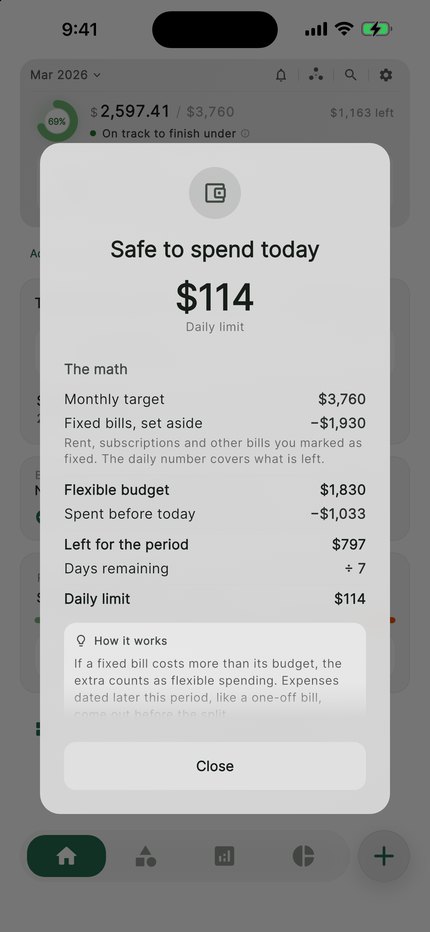
Many people in the US are paid every two weeks. CentsCheck budgets by the month. Set a payday every two weeks or every week and see whether this month's budget gets you there: the Forecast to payday card shows what you are likely to have left on payday.
If your next payday falls after the budget month ends, the forecast stops at the end of the month and says so.
Log card, Apple Pay and Google Pay spending
Tapped a card or paid with Apple Pay or Google Pay? Log it in seconds: amount, category, done. CentsCheck doesn't connect to your bank. To catch up, import a statement from your bank and check the rows before they are saved.
CentsCheck, YNAB, Monarch and Rocket Money
YNAB is a subscription budgeting app built around giving every dollar a job; it can import from your bank or work from what you enter. Monarch is a subscription app that links your accounts for one view of spending, net worth and goals. Rocket Money links your accounts to track spending and subscriptions.
CentsCheck works without a bank link and puts one daily number first. It is free to start.
What it costs
Safe-to-Spend, budgets, quick logging and one shared pool are free. CentsCheck Pro adds full imports, more pools, portfolio tracking and exports.
| CentsCheck Pro | App Store and Google Play |
|---|---|
| Monthly | US$4.99 |
| Yearly | US$34.99 |
| Once, for life | US$89.99 |
What each store charges a new customer in the US, read from the stores on 19 October 2026.
What CentsCheck doesn't do
- It doesn't connect to your bank. You log spending yourself, or import a statement or a screenshot of your banking app. The free plan saves 2 imports of up to 10 rows each.
- Your budget runs by the month. The month can start on any day, from the 1st to the 31st or the last day, but there is no weekly or fortnightly budget.
Try the sum first
The safe-to-spend calculator works out a daily number from the money you have, the bills still due and your next payday. It runs in your browser and saves nothing.